Brenda Klaus Peters
Brenda Klaus Peters
These photos are yours to keep and share!
• On mobile: press & hold the photo, select Save Image
• On desktop: click the Download button on the photo
Need help saving?














































































These photos are yours to keep and share!
• On mobile: press & hold the photo, select Save Image
• On desktop: click the Download button on the photo
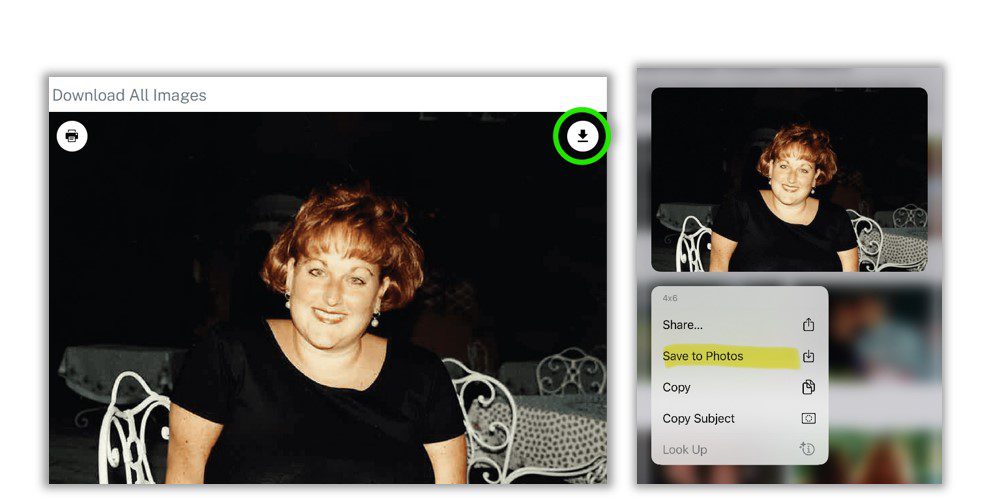
If You Are Using a Phone or Tablet
1. Touch and hold your finger on the photo you want, or select the “download” icon
2. A small menu will appear.
3. Tap “Save Image” or “Save to Photos.”
4. The photo will be saved to your Photos or Gallery app.
👉 Tip: You can find the photo later in your phone’s Photos app.
If You Are Using a Computer (Desktop or Laptop)
1. Move your mouse over the photo.
2. Right-click on the photo (press the right mouse button).
3. Click “Save Image As…”
4. Choose where you want to save it (Desktop or Pictures folder works best).
5. Click Save.
👉 Tip: Look for the photo later in the folder you selected.